
01Step 1
Understand the Business
I learn how your team currently handles the process, what tools are involved, and what the business needs the workflow to accomplish.
I design and build AI-powered workflow systems that connect your tools, eliminate repetitive work, and keep leads, data, documents, customer requests, and internal processes moving without constant manual intervention.
Every system starts with understanding your current process, bottlenecks, business rules, and team responsibilities.
Real and demonstration workflows across sales, marketing, finance, support, and operations — showing how I connect systems, automate repetitive work, and turn manual processes into reliable workflows.
Select any project to view the full workflow architecture.
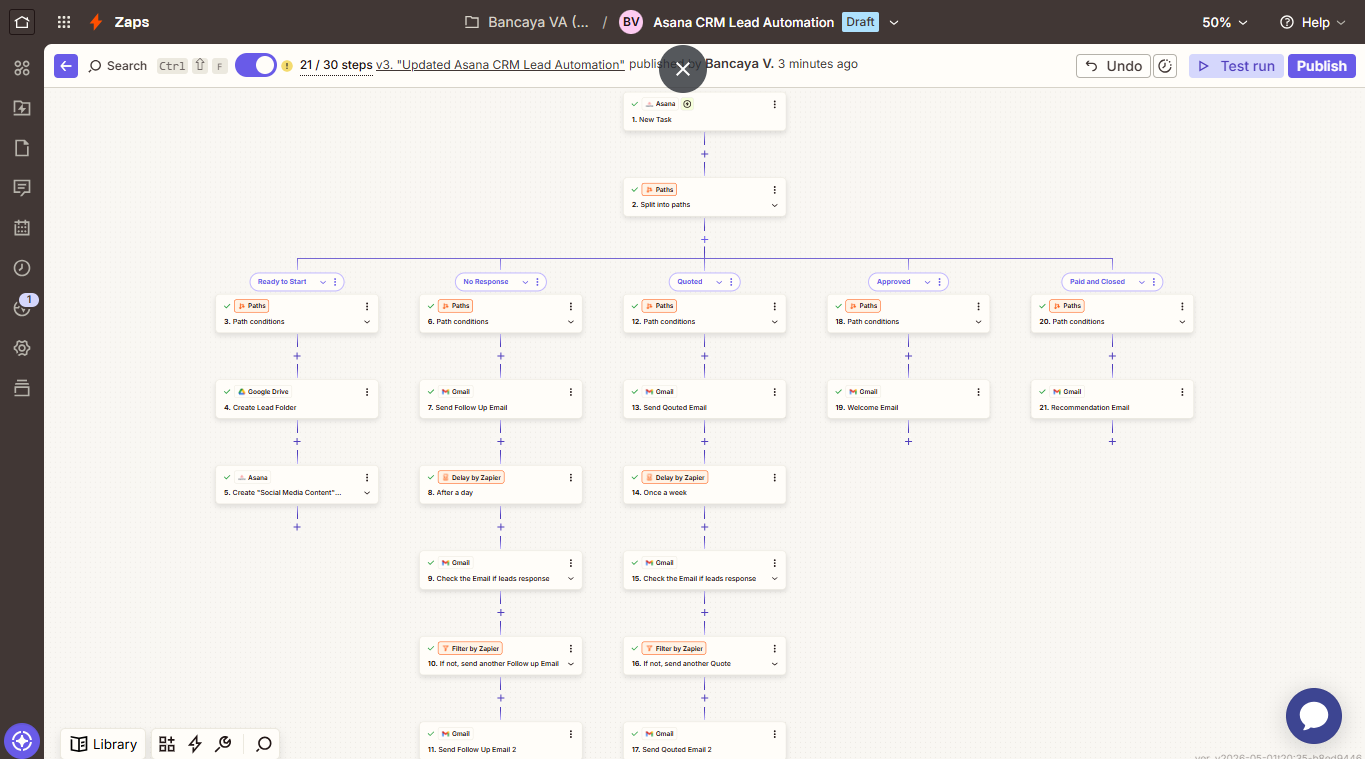
A multi-step Zapier build that turns a task board into a working CRM, moving each lead through its stage with the right email, folder, and timed follow-up.
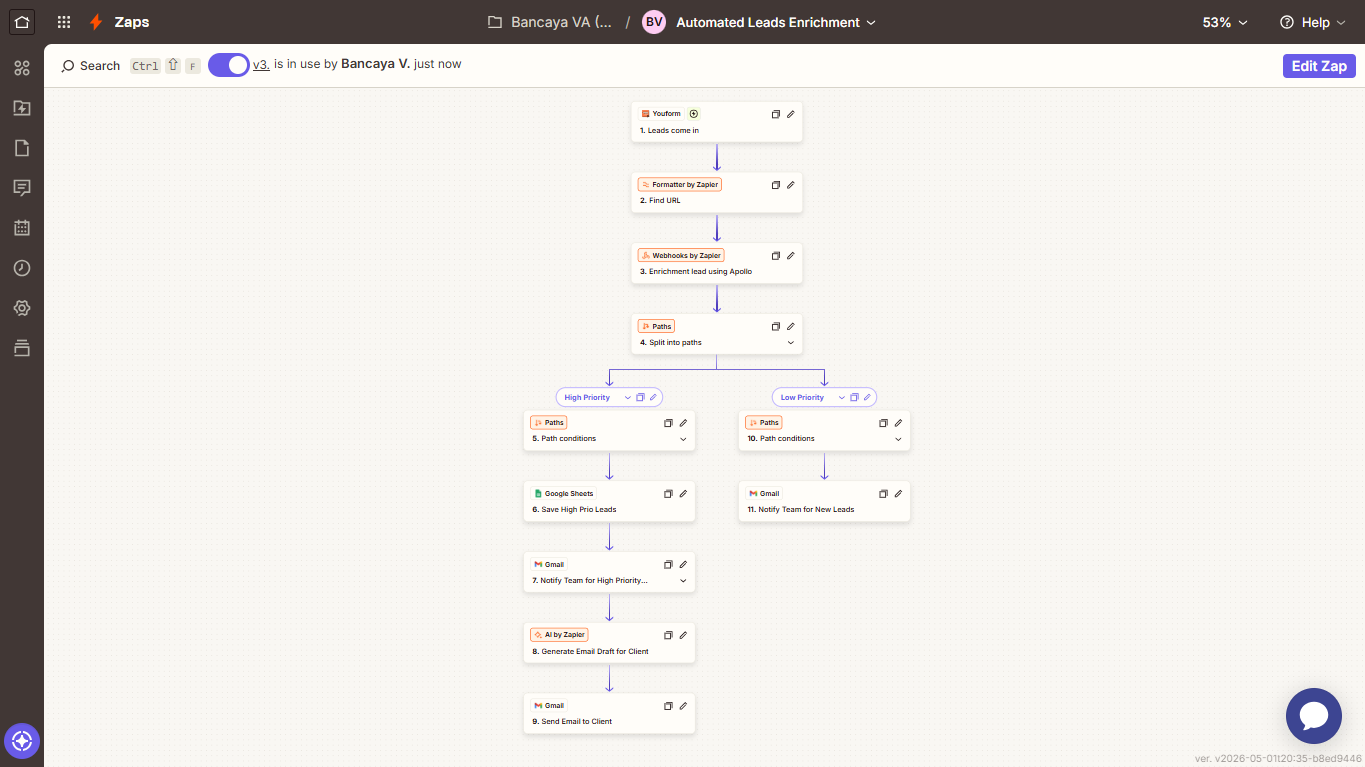
Form submissions are cleaned, enriched with company and role data, then routed so high-value prospects receive a personalised outreach email automatically.
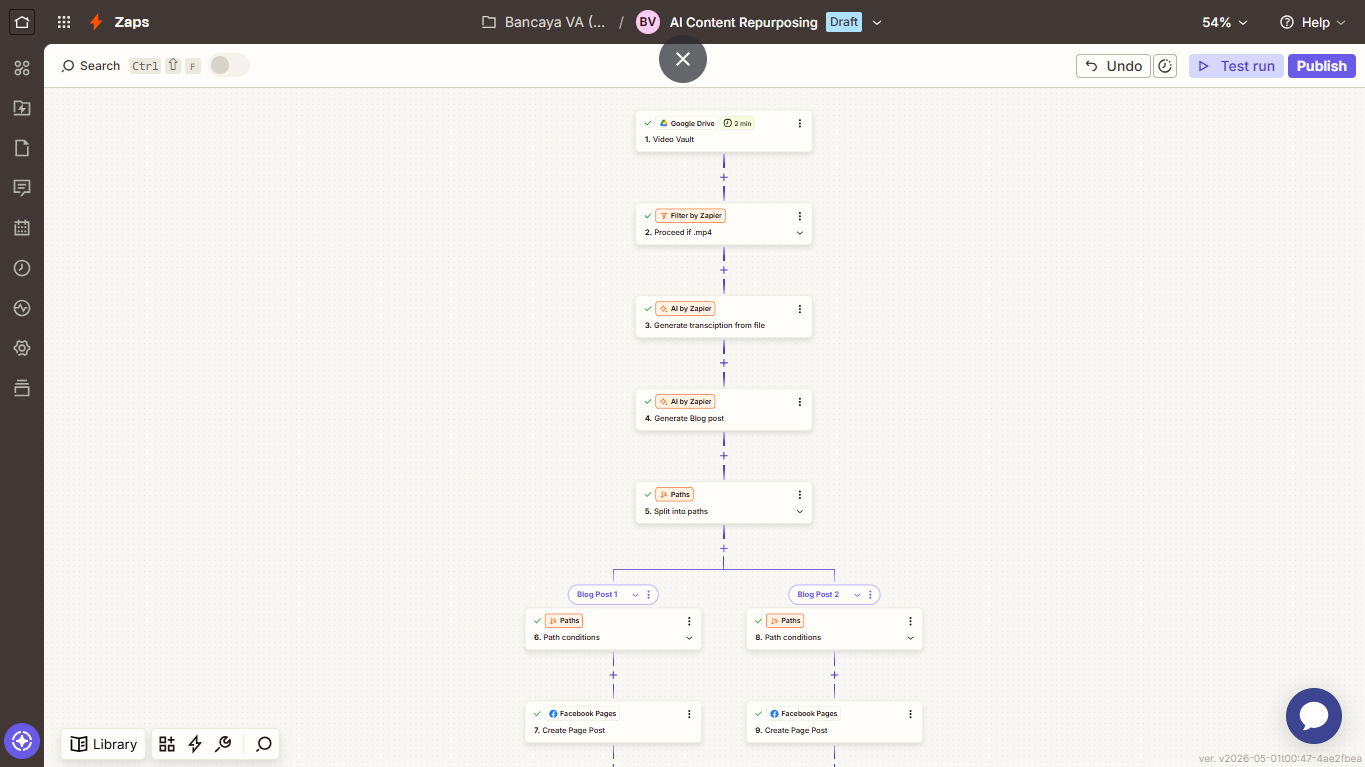
A single uploaded video is transcribed, rewritten into a long-form article, and reshaped into platform-ready social posts published without manual editing.
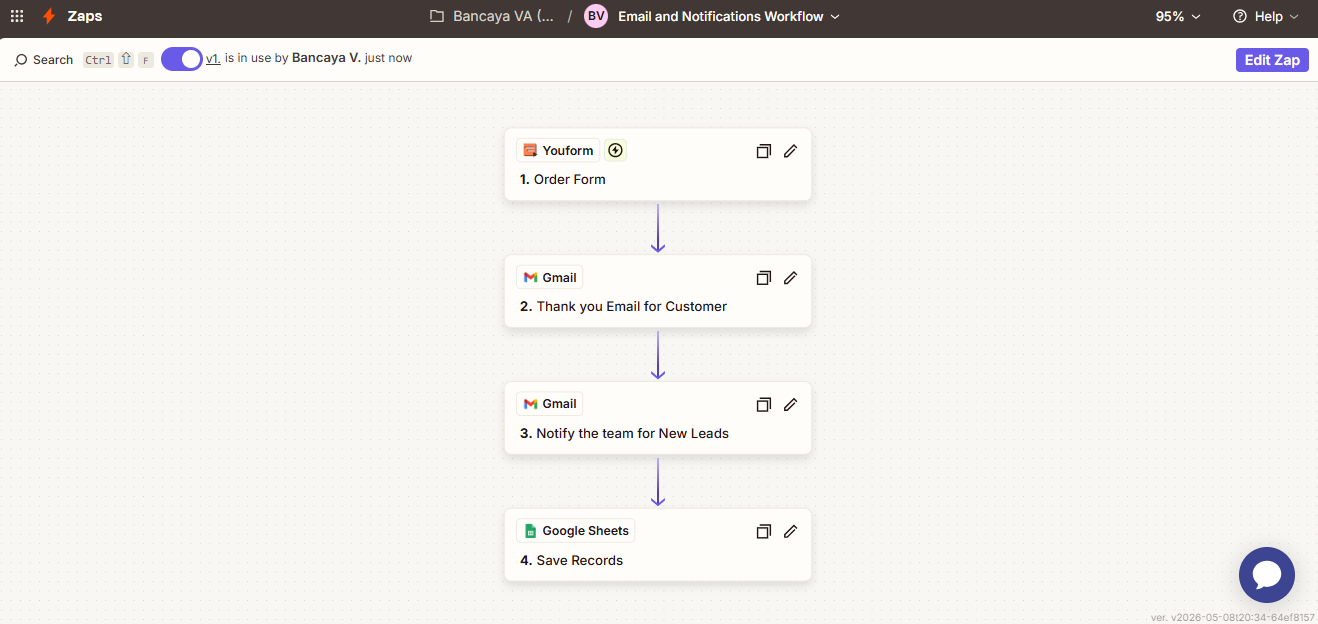
Every submission triggers a branded acknowledgement to the customer, an internal alert to the team, and a clean record in a central spreadsheet.
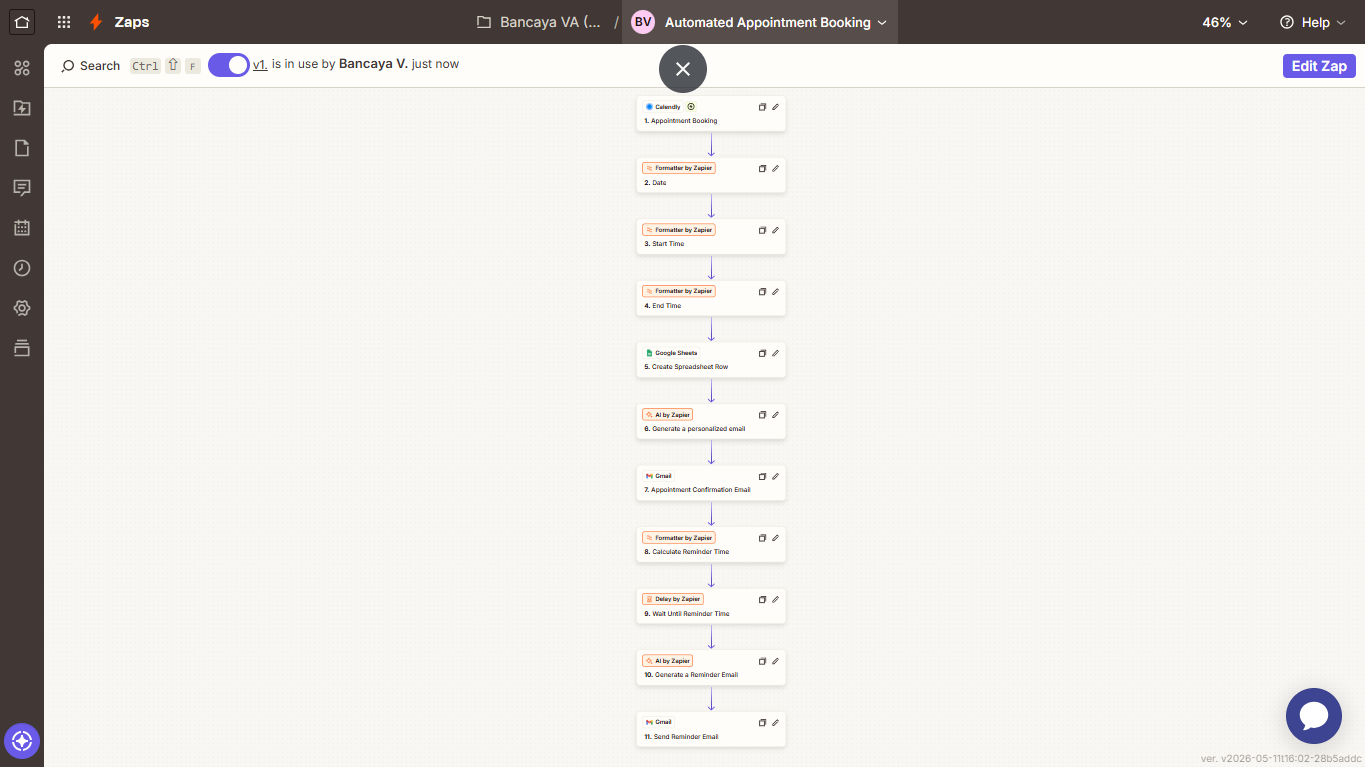
New bookings are logged, confirmed with a tailored message, and followed by a timed reminder before the meeting to reduce no-shows.
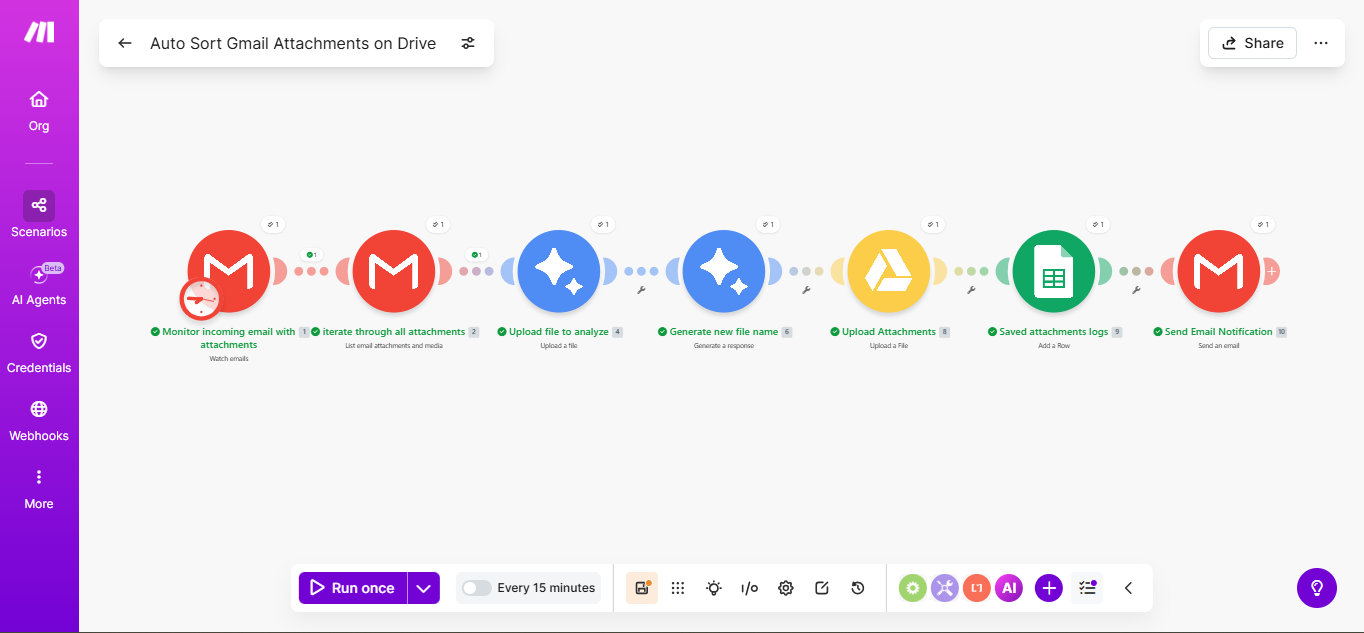
Incoming email attachments are read by an AI agent, renamed descriptively, filed into the correct drive folder, and logged for a complete audit trail.
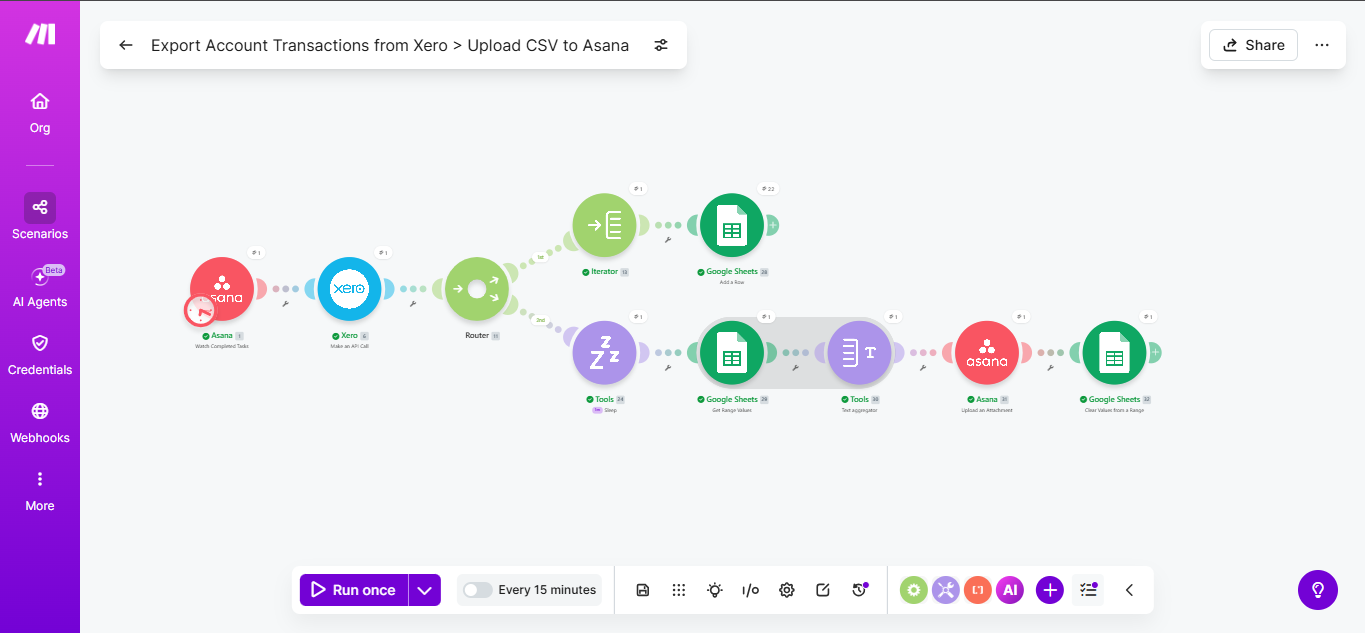
Live accounting transactions are pulled on demand, compiled into a clean CSV report, and delivered straight back into the relevant project task.
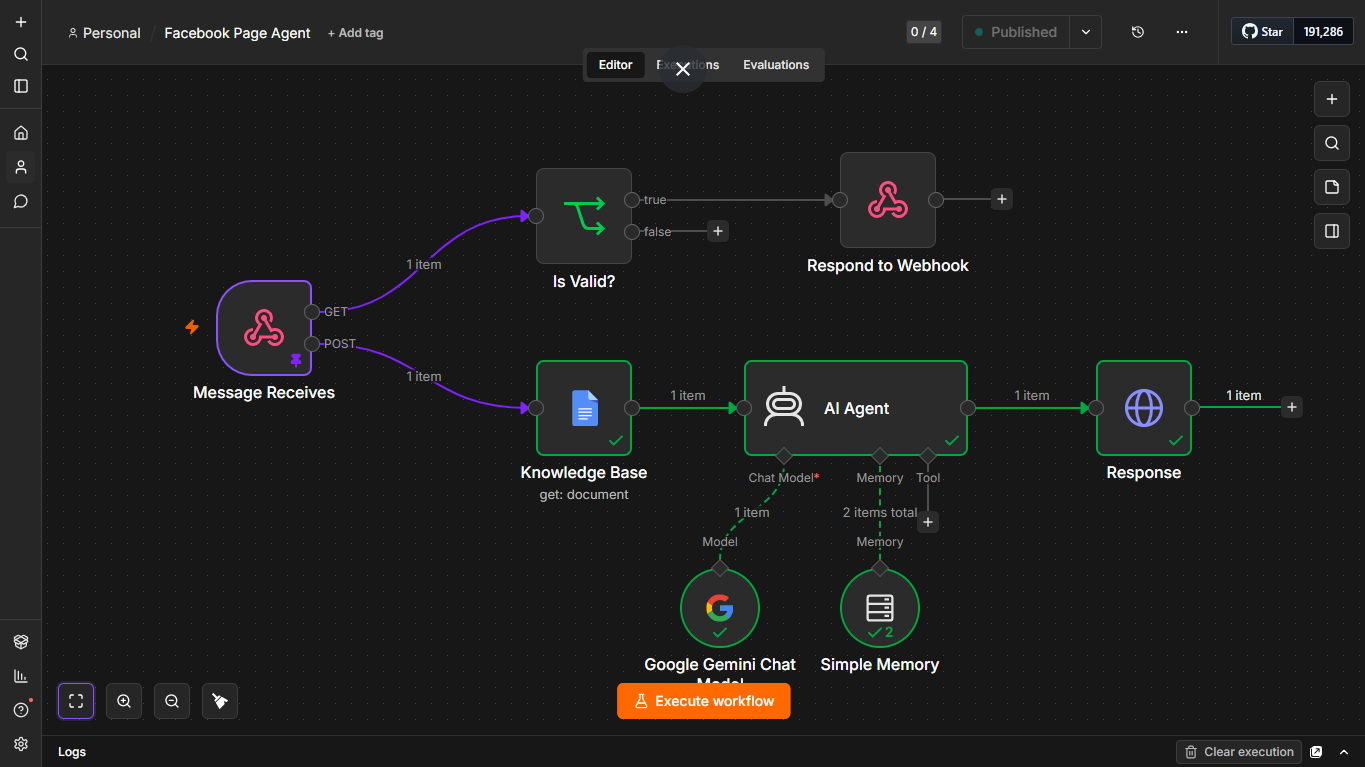
A demonstration of how a dental clinic could respond to common Messenger inquiries after hours while keeping clinical questions and sensitive concerns with the clinic team.
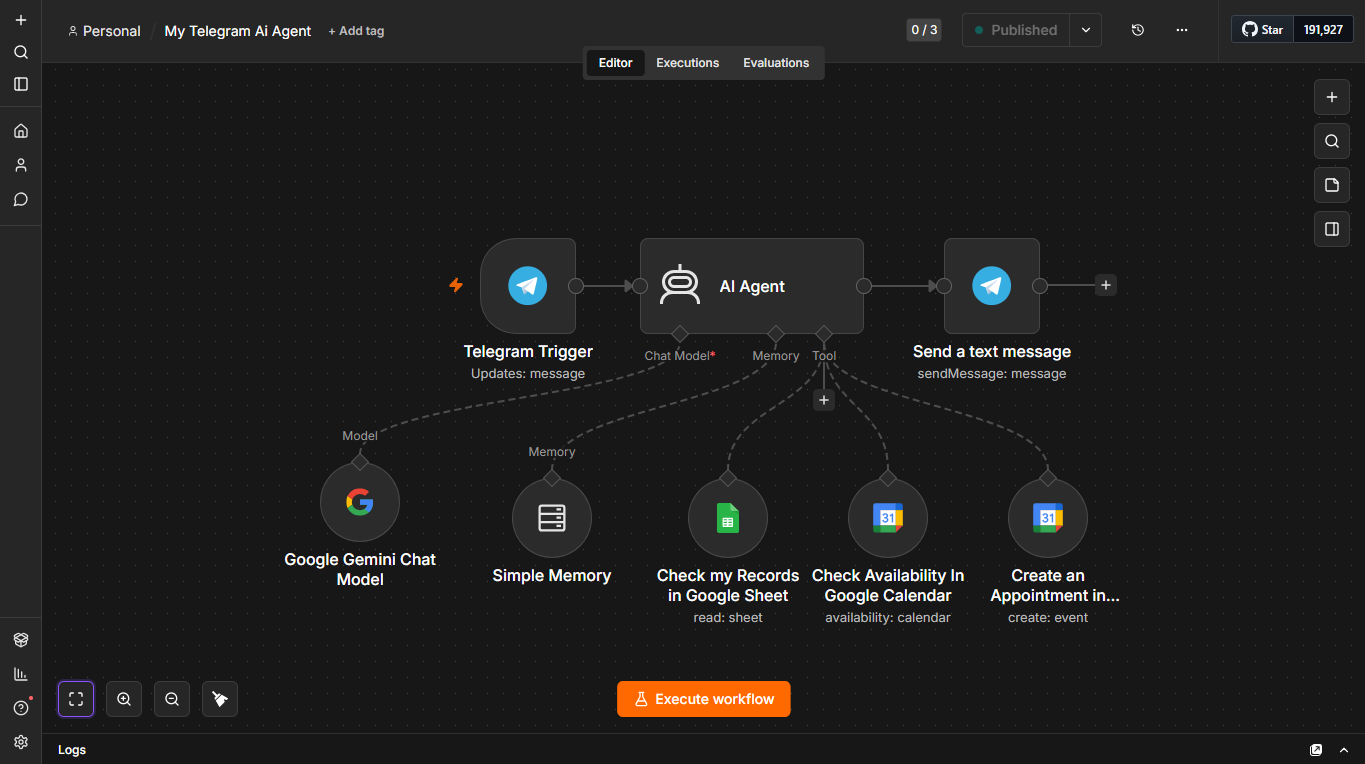
A demonstration of a chat-based scheduling flow that could guide prospective patients from an initial inquiry to a requested consultation slot using clinic-defined rules.
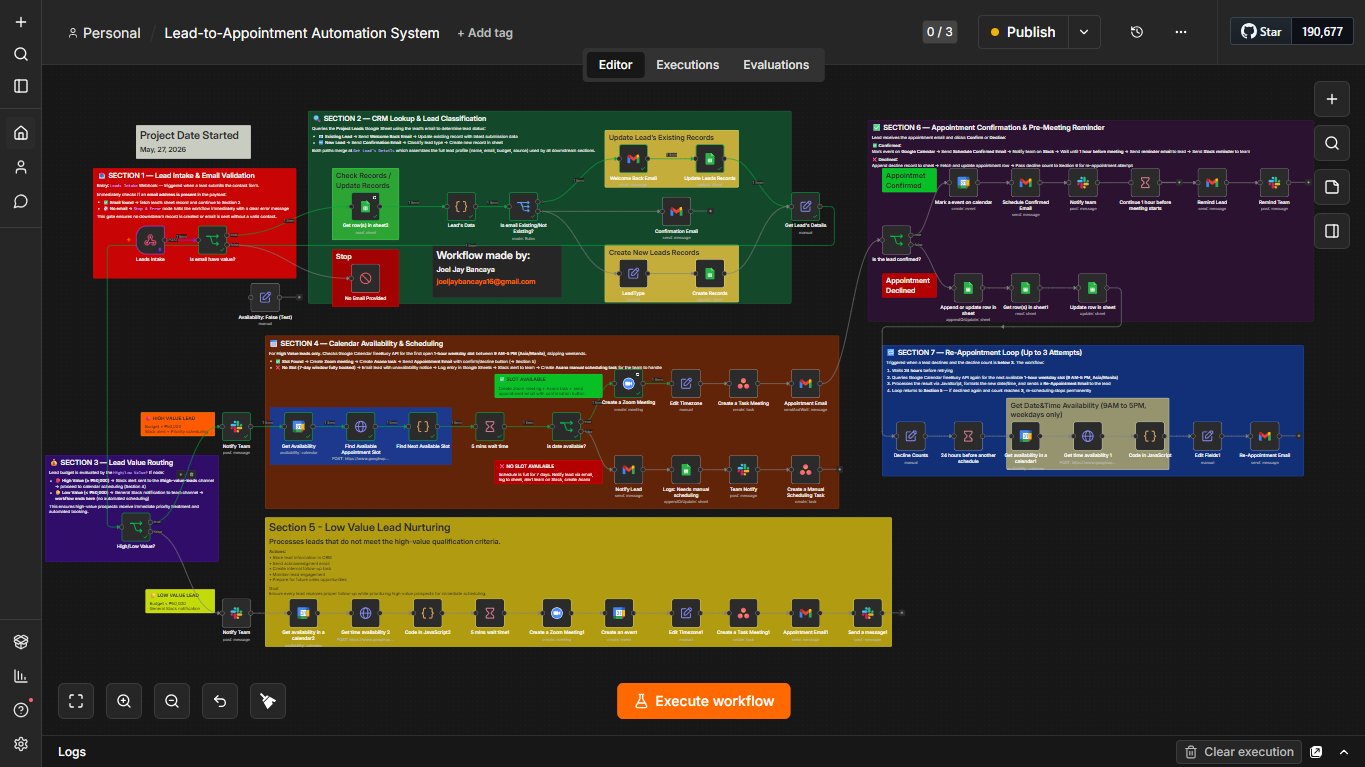
A complete lead-to-appointment automation system built around a core workflow and supporting sub-workflows for appointment rescheduling and re-appointment approval. The system connects lead intake, appointment processing, scheduling logic, approval decisions, and follow-up actions into one coordinated workflow architecture.
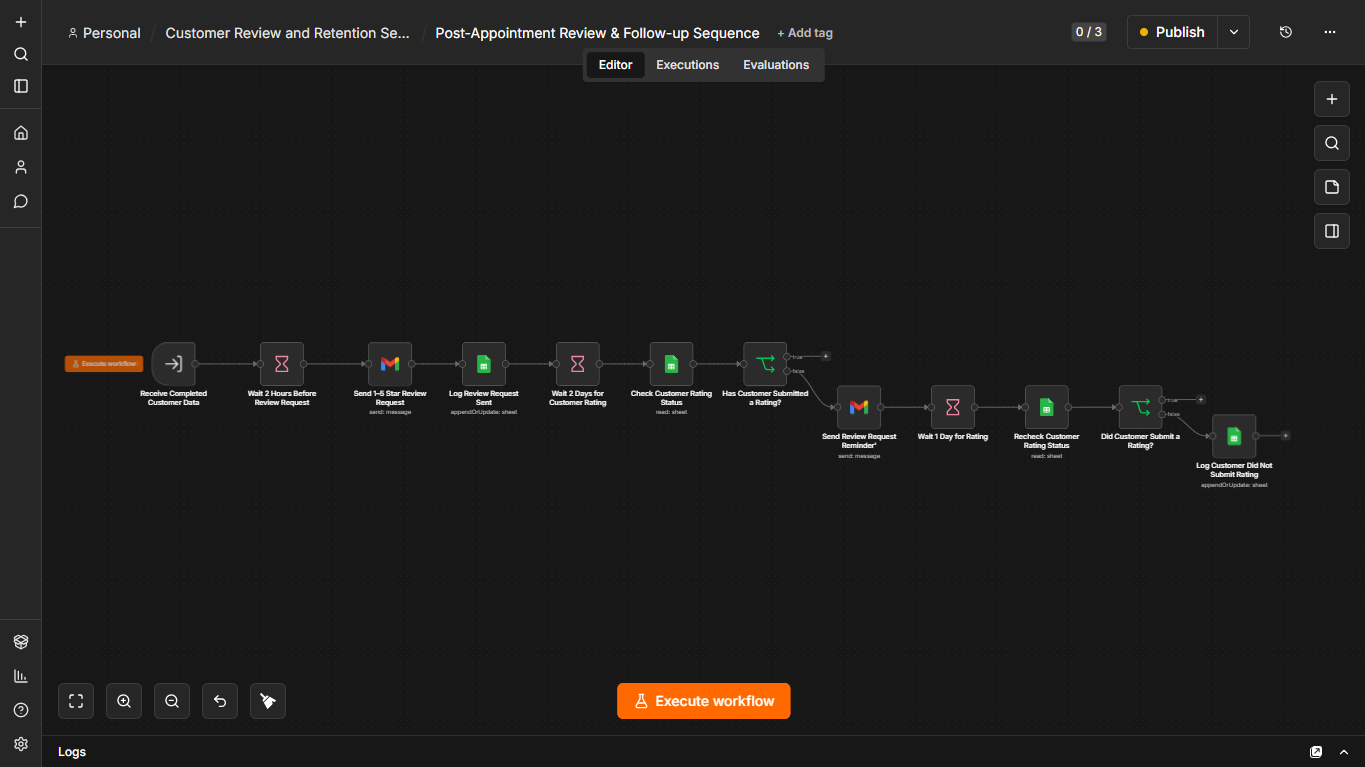
An automated post-service client lifecycle system that coordinates personalized aftercare, review requests, customer feedback, service recovery, retention follow-ups, and re-engagement. The system uses connected workflows to collect customer ratings, route positive feedback toward reviews, escalate low ratings for private recovery, and continue treatment-specific follow-up sequences based on customer status.
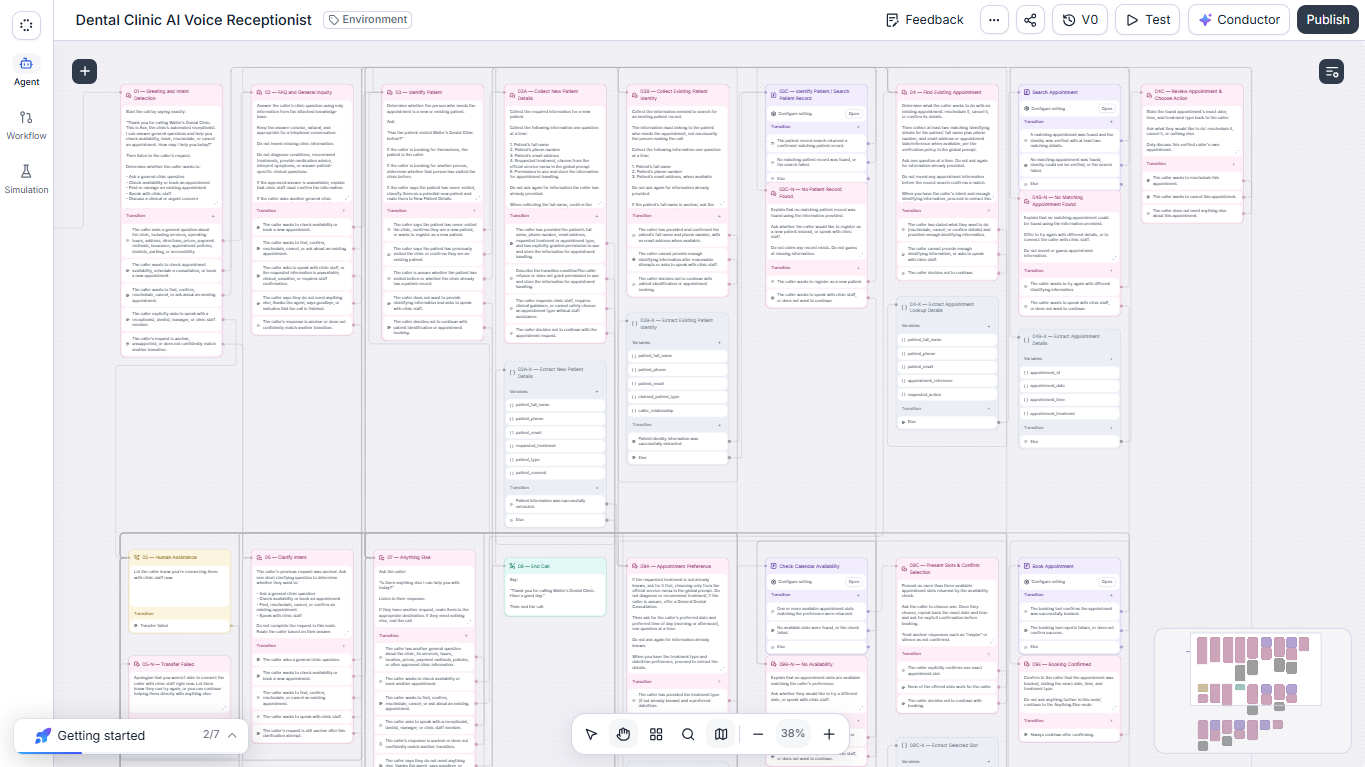
An AI-powered voice receptionist connected to a multi-workflow automation backend that handles patient inquiries and appointment operations — from checking availability to booking, searching, rescheduling, and cancelling appointments.
Repetitive tasks, disconnected tools, manual handoffs, and inconsistent processes create unnecessary work and make it harder for teams to operate efficiently.
Teams spend hours copying information, sending routine messages, updating records, and completing tasks that follow the same predictable steps.
Information gets manually moved between forms, spreadsheets, email, CRMs, calendars, and other systems that should be working together.
Leads, customer requests, follow-ups, approvals, and internal tasks can be missed when processes depend entirely on people remembering what to do next.
Teams spend unnecessary time collecting, cleaning, organizing, and reporting information that could be processed automatically.
A deep dive into one complete automation system I designed and built end-to-end, from initial inquiry through ongoing workflow management.
Seven connected workflows coordinate information capture, validation, scheduling, communication, reminders, and appointment changes — with clear handoffs between automation and staff.
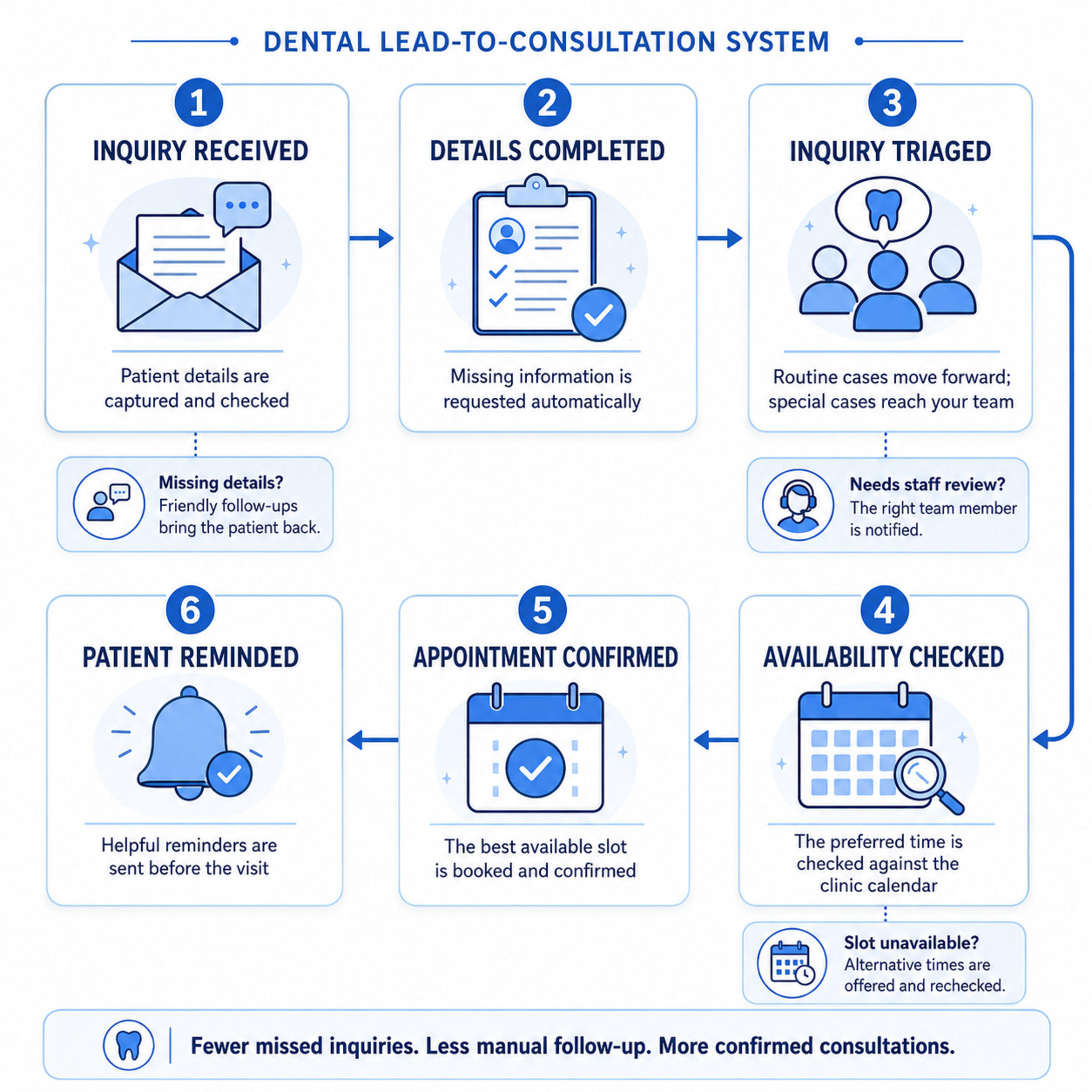
Collects and validates the information required by the business before moving the request to the next stage.
Applies business rules to determine what should happen next instead of relying on manual decisions for every request.
Moves information between systems and triggers the appropriate actions across the workflow.
Keeps staff informed and routes exceptions or situations requiring human judgment to the right person.
The business remains in control of its rules, communication, exceptions, and human handoffs while automation handles the repetitive work.
I don't start by building automation. I start by understanding how your business actually works, finding the bottlenecks, and designing a system around the process.
I learn how your team currently handles the process, what tools are involved, and what the business needs the workflow to accomplish.
We identify repetitive work, delays, manual handoffs, missed opportunities, and other points where the current process is slowing the business down.
I map the existing workflow from start to finish so we can see exactly where information enters, moves, changes, and requires human decisions.
I design the automation around your actual business rules, then connect the necessary tools, AI, APIs, and workflows.
Watch how seven connected workflows move a patient from inquiry and validation through booking, reminders, rescheduling, or cancellation.
Follow the patient journey in order, from the first inquiry through booking, reminders, rescheduling, or cancellation. Use the arrows, keyboard controls, or swipe gesture to explore all seven workflows.
Captures each inquiry, validates the patient's contact and consultation details, and sends incomplete inquiries to a secure completion form.
My approach starts with understanding how your business actually operates — the people, processes, tools, rules, and bottlenecks involved. From there, I identify where automation can remove repetitive work, improve consistency, and help your team operate more efficiently.
I design systems around the way your business actually operates instead of forcing a generic automation into your existing process.
I first understand the current workflow, tools, responsibilities, and business rules before deciding what should be automated.
The goal is not to automate everything. I focus on the repetitive, time-consuming, and error-prone parts of the process where automation creates real value.
Automation handles predictable work while exceptions, sensitive situations, and decisions requiring judgment are routed to the right person.
I connect the tools your team already uses so information can move between systems without unnecessary manual data entry.
Workflows can be monitored, reviewed, and improved as your business processes, tools, and requirements evolve.
Depending on your business's setup, the workflow may connect with existing calendars, forms, email, messaging channels, appointment records, or business-management platforms.
Hands-on training in n8n, Make.com, Zapier, and prompt engineering covering workflow design, integrations, data processing, APIs, AI agents, and practical prompt techniques.
These are training-completion credentials issued by independent training providers. Practical workflow builds and demonstrations remain the primary proof of capability.
Share your current inquiry and appointment process so I can identify practical workflow gaps, integration opportunities, and the clearest next step.
After submission, I will review your workflow information and contact you using your preferred method.